Important Step:
First, make sure the Outlook App is closed.
Then click here to download and run this OutlookFix.zip
Note: Before adding an email account to your computer. Microsoft needs you to run a manual installation of the following software updates:
Windows Updates
Optional / Performance Window Updates
MS Office Updates
Important Note: It is very important to restart the computer after installing any Windows Updates or Office Updates
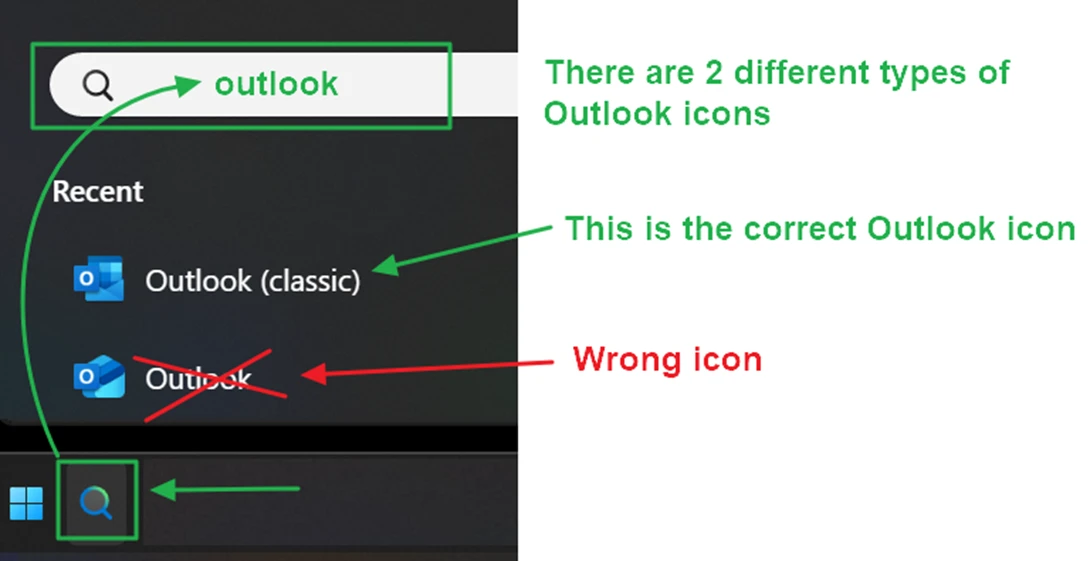
Note: If the computer doesn’t have the Outlook (Classic) version of the software, it means the MS Office software license in the computer doesn’t come with the Outlook (Classic).
If so, the user will first need to get the MS Office Home & Business 2024 or the MS Office Professional Plus 2024